You search for a YouTube converter because the job sounds simple.
Paste a link.
Choose MP3, WAV, or MP4.
Download the file.
Then the real experience starts.
One site opens three new tabs before you find the real Download button.
Another says “YouTube to WAV,” but after you paste the URL, it turns out you need to download the video somewhere else first and upload it again.
A third gives you a 1080p MP4 — except the file has no sound.
And if the video is long, something that worked perfectly for a five-minute song can suddenly sit on “Processing” for several minutes and fail.
So for this comparison, we focused on what actually matters after you paste the link:
- Does the conversion finish?
- Is the format really what the page promised?
- Does MP4 include both video and audio?
- Does WAV really work from a YouTube URL?
- How long does it take?
- Does the page open extra tabs or pop-ups?
- Does it require software or an account?
- What happens with longer videos?
- Is it still usable on mobile?
For Tunii, we also have something we do not have for the other tools: real production data from 14,364 YouTube conversion jobs.
For competing tools, the numbers below come from published 2026 benchmark data and current feature checks.
Quick comparison
| Tool | MP3 | WAV | MP4 | Browser-based | Best for |
|---|---|---|---|---|---|
| Tunii | Yes | Yes | Yes | Yes | Fast free downloads |
| NoAdsDL | Yes | — | Limited focus | Yes | Fast MP3 conversion |
| Loader.to | Yes | Some workflows | Yes | Yes | More format choices |
| CNVMP3 | Yes | — | Yes | Yes | Occasional MP3 / MP4 downloads |
| TuneFab VideOne | Yes | — | Yes | No | Playlists and high-resolution video |
| VideoProc Converter AI | Yes | Yes | Yes | No | Desktop WAV workflow |
| yt-dlp | Yes | Yes | Yes | No | Maximum control and automation |
1. Tunii — MP3, WAV and MP4 without installing anything
The workflow is simple:
Paste a YouTube link, choose the format you need, and process it in the browser.
A lot of the time, the job is not complicated.
You found a lecture and want the audio for a commute.
You have a music video but only need the MP3.
Or you want the full MP4 and do not want to install a desktop downloader for one link.
That is where a browser tool makes sense.
What 14,364 real Tunii jobs show
Between August 23 and September 23, 2026, Tunii processed 14,364 YouTube conversion jobs.
Videos under 30 minutes had a:
98.7% success rate
Videos between 30 and 60 minutes had a:
95.3% success rate
The median processing time for successful jobs was:
545 seconds
And only:
0.01% of failed jobs were ultimately attributed to timeout
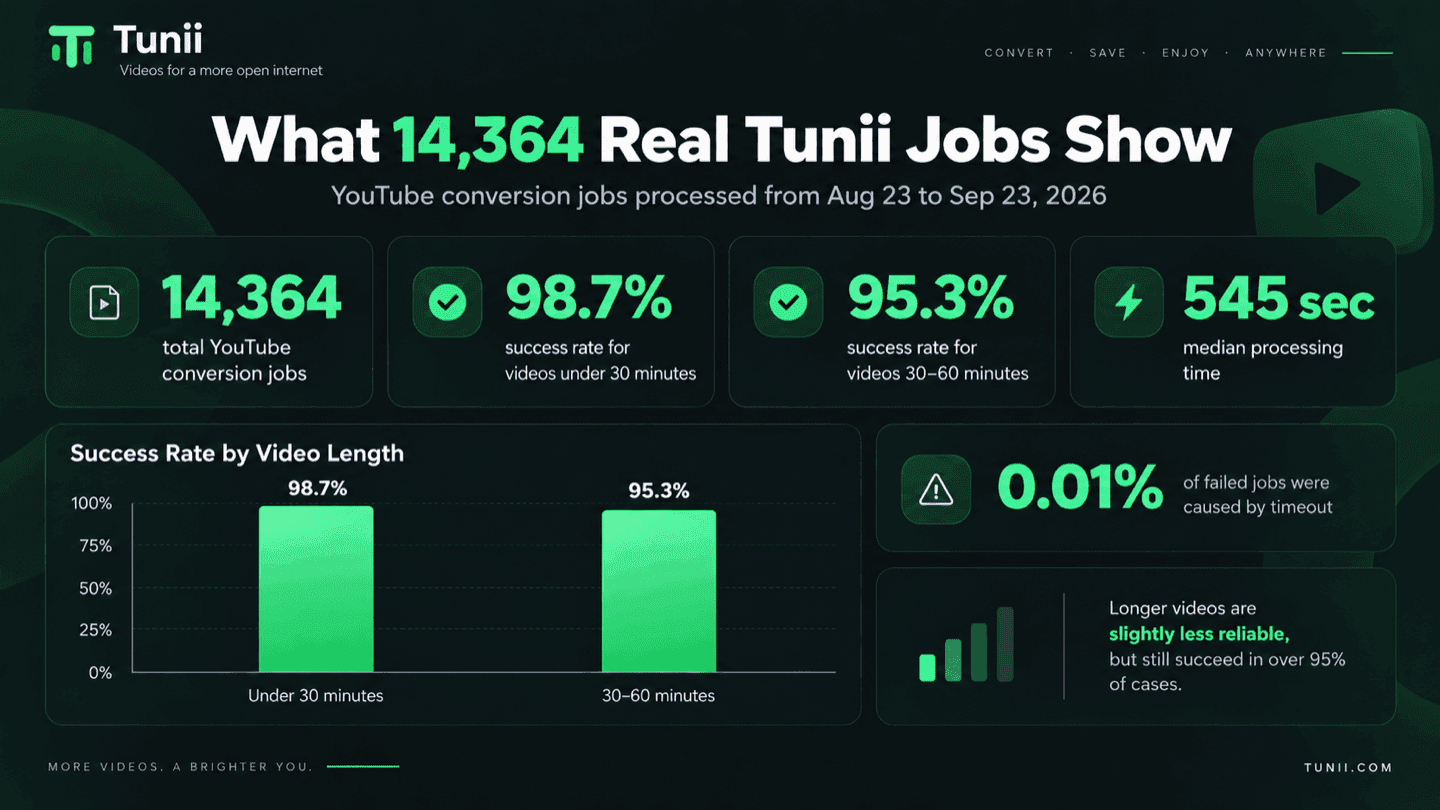
That last number is useful because long processing time is often blamed for every failed conversion.
Our data says that is usually too simple.
A job can fail before the audio or video is ever converted.
The source may be restricted.
The stream may not be retrievable.
YouTube may change how access works.
Or the conversion may finish and the final download still fail in the browser.
We break those cases down separately in our YouTube to MP3 not working guide.
Where Tunii makes sense
Tunii is useful when you want one of these:
“Give me the MP3.”
“Give me a WAV I can edit.”
“Give me the full MP4.”
without turning the job into a software-installation project.
Where we would use something else
If you download full playlists every day, automate hundreds of links, or need detailed codec and format controls, a desktop or command-line tool is more suitable.
That is not what Tunii is trying to replace.
2. NoAdsDL — Good when the job is simply YouTube → MP3
One published 2026 test ran 30 YouTube tracks across music, podcasts, and speech.
The reported result for NoAdsDL was:
28 successful conversions out of 30
Average processing time:
21 seconds
Pop-ups:
0
The last number matters more than it sounds.
A converter that takes 30 seconds but opens four new tabs often feels much slower than a converter that takes 40 seconds and simply gives you the file.
If your entire job is:
paste URL → get MP3
a focused converter like this is easy to understand.
The tradeoff is that it is not trying to be a full MP3 / WAV / MP4 toolbox.
3. Loader.to — More formats, but slower in published MP3 testing
In the same kind of published 2026 MP3 testing, Loader.to was reported at roughly:
27 successful jobs out of 30
with an average processing time of:
82 seconds
That is noticeably slower than several alternatives in the same dataset.
There was also an inconsistency in the published test: one section reported 27/30 successful conversions while another section reported a slightly different success number.
That is worth pointing out because benchmark tables often look more precise than they really are.
A small test should tell you the direction of the result.
It should not be treated like a permanent score.
4. CNVMP3 — Straightforward for occasional MP3 and MP4 downloads
CNVMP3 is easy to understand.
Paste a link.
Choose audio or video.
Wait for the file.
Published 2026 MP4 testing reported approximately:
2 minutes 30 seconds for a 10-minute video.
For a five-video playlist:
around 7 minutes 10 seconds
The same published benchmark reported support up to:
1080p
with a stability figure of:
85%
Those numbers will obviously move depending on the source and server load.
But they are more useful than a homepage badge that simply says “Fast.”
CNVMP3 makes the most sense when you occasionally need one MP3 or MP4 and do not want desktop software.
If playlists and higher resolutions become part of your normal workflow, other tools are easier to live with.
5. TuneFab VideOne — More practical when playlists become the job
There is a big difference between:
“I need this one video.”
and:
“I need this 30-video playlist.”
The first job fits naturally in a browser.
The second is where desktop software starts earning its installation.
Published 2026 MP4 benchmark data reported roughly:
35 seconds for a 10-minute video.
A five-video playlist took about:
2 minutes 50 seconds
The same test reported support up to:
8K, plus playlist, channel, subtitle, and batch workflows.
If playlists are normal for you, batch controls matter more than having the smallest possible interface.
6. VideoProc Converter AI — One of the more direct YouTube → WAV workflows
WAV is where this market gets strange.
Search “YouTube to WAV” and you would expect every result to do this:
YouTube URL → WAV file
That is not what always happens.
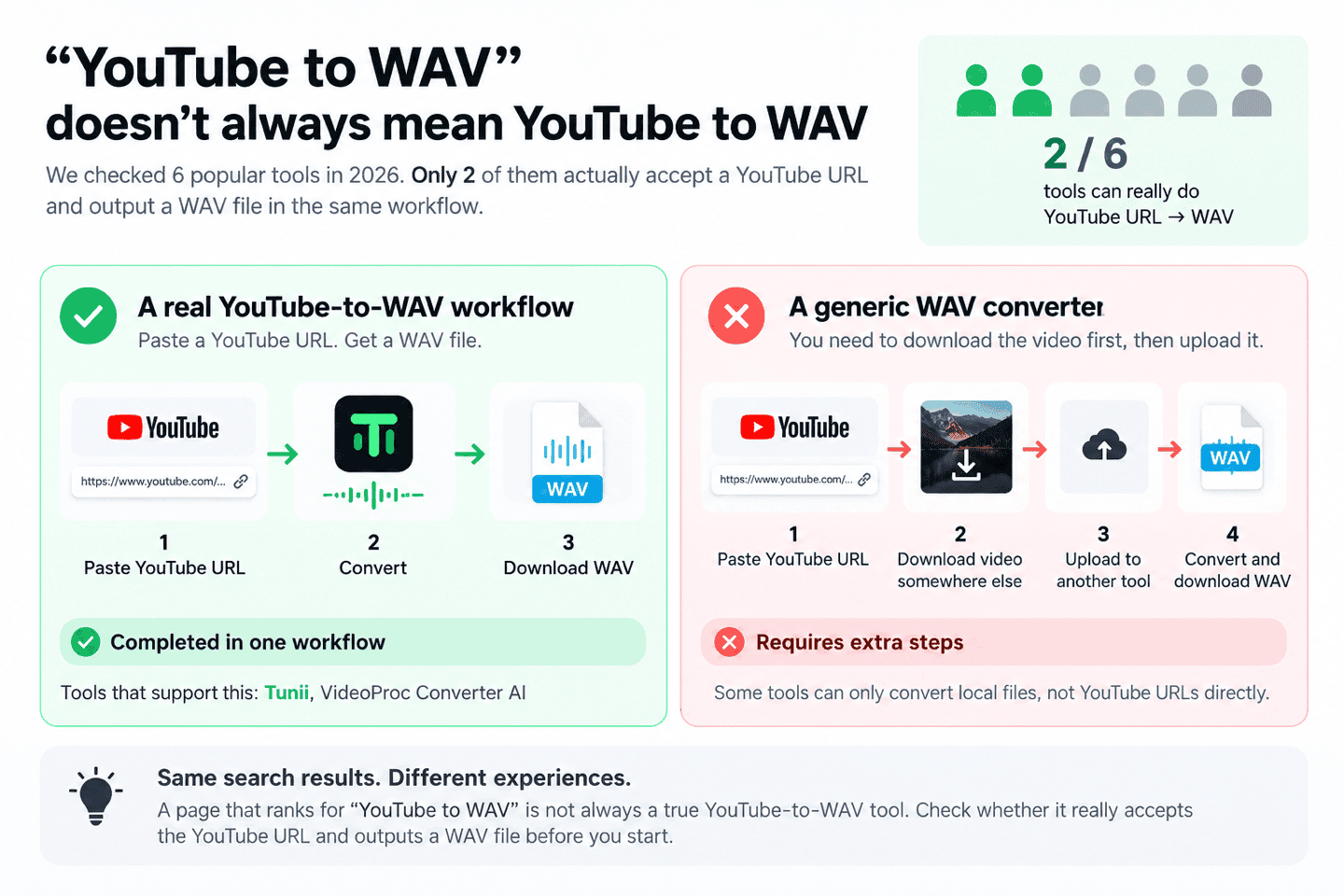
A 2026 capability check looked at six tools commonly appearing around YouTube-to-WAV searches.
Only 2 out of 6 actually handled both parts of the workflow:
- accept the YouTube URL;
- produce WAV.
Some tools accepted the URL but could not output WAV.
Others could create WAV, but only after you uploaded a local file.
VideoProc was one of the tools that could complete the full workflow.
That sounds like a small distinction until you are the person who has just downloaded a video, opened a second site, uploaded the whole file again, and waited for another conversion.
That is not the same product experience as one-step URL → WAV.
7. yt-dlp — The option when you care more about control than interface
yt-dlp solves a different problem.
There is no polished box asking you to paste a URL.
You work from the command line.
In return, you get control over:
- formats;
- MP3;
- WAV;
- MP4;
- playlists;
- subtitles;
- metadata;
- automation;
- format selection;
- scripts.
If you process a lot of URLs or want to automate the workflow, that control is valuable.
If somebody sends you one YouTube link and says:
“Can you turn this into an MP3?”
opening a terminal may feel like overkill.
That is the tradeoff.
What published MP3 testing says about the real user experience
One 2026 benchmark tested eight YouTube-to-MP3 tools across 30 tracks.
The reported results were:
| Tool | Successful conversions | Avg. time | Pop-ups |
|---|---|---|---|
| Tunii | 29/30 | 20 sec | 0 |
| NoAdsDL | 28/30 | 21 sec | 0 |
| Loader.to | 27/30 | 82 sec | 0 |
| 9xbuddy | 25/30 | 34 sec | 1–2 |
| YT1s | 23/30 | 29 sec | 3–5 |
| Y2mate | 20/30 | 31 sec | 4–6 |
| SSYouTube | 18/30 | 44 sec | 3–4 |
| SaveFrom | 17/30 | 51 sec | 2–4 |
| MP3ify | 12/30 | Variable | 5+ |
The useful part of this table is not whether 29 seconds is better than 31 seconds.
It is the difference between:
0 extra tabs
and:
five extra tabs
Anyone who has used free download sites knows that difference immediately.
You click what looks like Download.
A casino page opens.
You close it.
Go back.
Click again.
Another tab opens.
By the time you get the real file, the stopwatch is not the main problem anymore.
That is why we care about the whole workflow, not only processing time.
“YouTube to WAV” does not always mean YouTube to WAV
This was the most useful thing we found in the current WAV research.
In one six-tool check:
only 2 of 6 tools actually handled YouTube URL → WAV in one workflow.
The rest did only part of the job.
That means users need to distinguish between:
A real YouTube-to-WAV workflow
Paste YouTube URL.
Receive WAV.
and:
A generic WAV converter
Download the YouTube media somewhere else.
Upload it.
Convert it.
Download it again.
Both may rank for the same search.
They are not the same thing.
WAV is not a magic quality upgrade
This is another place where format labels cause confusion.
WAV is lossless.
That does not mean converting a YouTube source to WAV restores the original recording.
YouTube has already compressed the audio.
If information was lost before the converter received the stream, exporting to WAV cannot recreate it.
What WAV does give you is a better working format for:
- DAWs;
- editing;
- repeated processing;
- sampling;
- production workflows.
If you just want to listen to a podcast on your phone, the much larger WAV file may do nothing useful for you.
Use YouTube to WAV when you actually need the editing-friendly format.
The same thing applies to “320kbps MP3”
A converter can absolutely produce a file encoded at:
320kbps
But this is different from saying:
the YouTube source contained 320kbps worth of useful audio information.
It may not have.
A higher output bitrate cannot reconstruct detail that disappeared earlier in the chain.
So when a converter advertises:
320kbps MP3
the meaningful question is:
What was the quality of the source audio before the MP3 was created?
For casual listening, file size and compatibility may matter more than choosing the biggest bitrate number on the screen.
MP3, WAV or MP4?
The decision is simpler than converter pages often make it look.
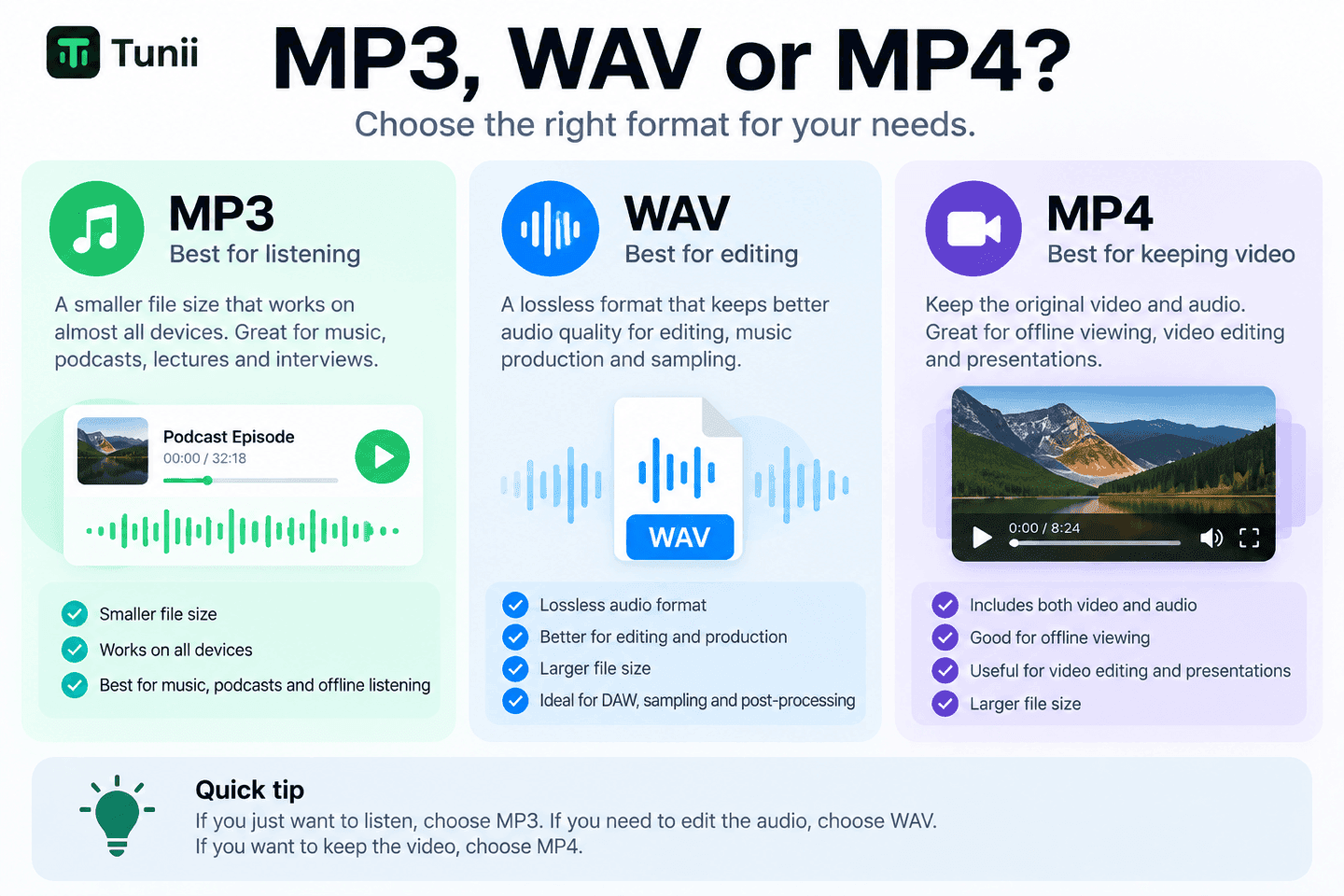
Choose MP3 if you want to listen
Good for:
- music;
- podcasts;
- lectures;
- interviews;
- offline listening.
Smaller files.
Works almost everywhere.
Choose WAV if you want to edit
Good for:
- DAWs;
- music production;
- sampling;
- repeated audio processing.
Larger files.
No extra lossy compression from the WAV format itself.
But it cannot restore quality already lost at the YouTube source.
Choose MP4 if you want the video
Good for:
- offline viewing;
- editing;
- presentations;
- keeping the visual context.
And one thing worth checking after downloading:
Does the MP4 actually have audio?
At higher resolutions, video and audio streams may be handled separately, which is one reason poorly implemented downloaders can sometimes produce a video file with no sound.
If you already have the video file, stop downloading it again
This is an easy step to miss.
You search for “YouTube to MP3,” but the MP4 is already sitting in your Downloads folder.
At that point, there is no reason to fetch the media from YouTube again.
Use Extract Sound from Video and work directly from the file you already have.
It removes an entire step from the workflow.
Which one should you use?
If you have one link and do not want to install anything:
Tunii is built for that workflow.
If you only need quick MP3 downloads:
A focused MP3 converter such as NoAdsDL can be enough.
If playlists and channels are a regular part of the job:
A desktop downloader makes more sense.
If you need WAV:
Check that the tool actually supports YouTube URL → WAV, not just WAV conversion after an upload.
If you want automation and full control:
yt-dlp is the stronger tool.
The useful distinction is not “which converter has the biggest feature list?”
It is:
What happens after you paste the link?
Does it finish?
Does the file match what you selected?
Does the MP4 have sound?
Is WAV actually WAV?
Does it open five tabs?
Does it still work when the video is 45 minutes long?
Those are the things we would check before trusting a “Best YouTube Converter” label.
FAQ
What is the best YouTube converter for MP3, WAV and MP4?
For occasional browser-based conversions, Tunii supports all three formats in one workflow. Desktop and command-line tools become more useful when you need playlists, batch processing, or deeper format control.
Why do some YouTube-to-WAV tools not actually produce WAV from a link?
Some are generic file converters that require a local upload. They may appear in YouTube-to-WAV search results even though they do not handle the full URL-to-WAV workflow.
Does WAV sound better than YouTube MP3?
WAV avoids another lossy compression step, but it cannot recover audio information already removed from the YouTube source.
Is 320kbps MP3 always better?
No. The output can be encoded at 320kbps, but the source audio may not contain enough information for that higher bitrate to produce an audible improvement.
Why can an MP4 download have video but no sound?
At some resolutions, YouTube may provide video and audio as separate streams. The downloader has to combine them correctly into the final MP4.
Are longer YouTube videos less reliable to convert?
In Tunii's production data from August 23 to September 23, 2026, videos under 30 minutes completed successfully 98.7% of the time, while videos between 30 and 60 minutes completed successfully 95.3% of the time.
 Tunii
Tunii