7 Best Background Music Removers for Video in 2026: Compared
A background music remover is easy to judge when the test clip is clean: one speaker, quiet instrumental music, no echo.
Real videos are rarely that convenient.
The music may be louder than the speaker. The soundtrack may contain a singer. There may be room noise, sound effects, or compression from TikTok, YouTube, or an old export.
That is where the differences between these tools start to matter.
Some are built as stem separators. Some are designed around speech. Others can take a finished video, remove the unwanted soundtrack, and give you a usable video back.
If your starting point is already an MP4 and your goal is simply to keep the person talking while removing the music, Tunii's Background Music Remover is our top pick for the most direct workflow.
Our Picks at a Glance
| Tool | Best For |
|---|---|
| Tunii | Best overall for a simple video-to-clean-video workflow |
| MusicRemover.ai | Best for separating speech, music, and other sounds |
| Adobe Podcast | Best for interviews and speech-heavy recordings |
| Moises | Best for dialogue, soundtrack, and effects stems |
| AudioCleaner | Best for quick browser-based processing |
| LALAL.AI | Best for broader stem separation |
| iZotope RX 12 Advanced | Best for professional post-production |
Our top pick for most video creators is Tunii, mainly because the job does not stop at a separated voice file. You upload a finished video and get a cleaned video back.

What We Looked for
We focused on the things that matter most for this particular job rather than comparing every feature each product offers.
Can it take a finished video directly?
This sounds obvious, but many audio-separation tools still make the user think in terms of stems rather than finished videos.
For most creators, the useful workflow is:
Upload video → remove background music → preview result → download cleaned video
not:
Extract audio → upload audio → separate stems → download voice → open video editor → rebuild video
Does it preserve speech rather than simply remove sound?
A proper background music remover is different from a mute button.
The goal is to keep dialogue intelligible while reducing or removing the music underneath it.
What happens when the background song has a singer?
This is where ordinary vocal separation can struggle.
Imagine a person speaking in the foreground while a pop song plays behind them.
A normal vocals/instrumental model may hear the foreground speaker and the singer in the background track as the same broad category: vocals.
That can leave part of the background song behind.
Does the result still sound like a real video?
A perfectly isolated dry voice is not always the best result.
If a video was filmed in a café, event hall, street, classroom, or game environment, removing every bit of ambience can make the result sound unnatural.
The best workflow depends on whether the system can distinguish dialogue, music, ambience, and sound effects rather than treating everything that is not speech as disposable.
If you want a deeper explanation of this problem before choosing a tool, read our guide to removing background music from a video without losing the voice.
1. Tunii — Best Overall for Removing Background Music from Video
Best for: Creators who already have a finished video and want the music removed without rebuilding the project in a separate editor.
The biggest difference with Tunii is not the number of stems it can show you. It is what happens after the separation.
Many tools can accept a video file, extract the audio, and return a voice stem. That is useful, but it still leaves one more job: putting the cleaned audio back into the video.
Tunii's Background Music Remover is built around the whole task instead. Upload the video, separate the foreground speech from the background music, and download the cleaned video with the original picture still intact.
Say you have a five-minute interview recorded in a café. The conversation is usable, but a song is playing in the room throughout the clip.
With an audio-first separator, you may end up with a cleaner dialogue WAV file and still need Premiere, Final Cut, or another editor to rebuild the video.
With Tunii, the intended result is the cleaned video itself.
What stands out
- Finished video goes in; cleaned video comes back
- Foreground dialogue is kept while background music is removed or reduced
- No separate video editor is required for the basic workflow
- Voice-only audio is also useful for subtitles, transcription, dubbing, or further editing
- The workflow is easy to understand even if you have never worked with audio stems
Where Tunii makes the most sense
Tunii is especially useful for:
- interviews with unwanted music in the room
- vlogs where the original soundtrack needs replacing
- tutorials with distracting background music
- social clips that need a different soundtrack
- older videos where the picture is still useful but the soundtrack is not
- clips that also need a voice-only track for captions or transcription
Limitations
Tunii still has the same fundamental limitation as every source-separation system: it cannot perfectly recover speech that is already buried under the soundtrack.
The most difficult case is a foreground speaker with a vocal song playing behind them. Both contain human voices, so separation becomes harder than removing a purely instrumental soundtrack.
Heavy compression, reverb, and very loud music can also leave artifacts or residual music.
Remove background music from your video with Tunii →
2. MusicRemover.ai — Best for Complex Mixed Audio
Best for: Videos where speech, music, and other environmental sounds are mixed together.
MusicRemover.ai is one of the more directly relevant tools in this category because it goes beyond a simple vocals-versus-instrumental split.
Its workflow is closer to separating foreground vocal or speech, background music, and other sounds. That is a useful distinction for real video footage.
A café interview, for example, may contain two people speaking, a song playing through speakers, cups and dishes, room noise, and people moving around. If the tool keeps useful non-music sounds separate from the soundtrack, the result has a better chance of sounding natural.
What we like
- Designed specifically around removing music rather than simply muting audio
- Handles video directly
- More appropriate for mixed real-world footage than a basic two-stem music separator
- Useful when ambience matters
- Makes individual separated components accessible
Where it gets difficult
The hard case is still a foreground speaker plus a background song with vocals.
Even with a more specialized separation approach, overlapping human voices are one of the hardest source-separation problems. If the speaker and singer occupy similar ranges at the same time, some leakage can remain.
Best use case
Choose this type of tool when the video has a more complicated soundtrack and you want greater access to the separated components.
If you mainly want the finished cleaned video with as little setup as possible, Tunii keeps the workflow more direct.
3. Adobe Podcast — Best for Interviews and Speech-Heavy Content
Best for: Podcasts, interviews, lectures, tutorials, and other content where speech is clearly the priority.
Adobe Podcast approaches the problem from a speech-production perspective rather than from music production.
That distinction matters.
Instead of assuming the file is a song, the workflow is naturally built around speech, music, and ambience.
That is how many editors think about interview or documentary audio.
What we like
- Strong focus on dialogue
- Suitable for both audio and video workflows
- Useful when speech intelligibility matters more than music-production flexibility
- Ambience can be treated separately rather than automatically discarded
- Fits naturally into a broader Adobe content workflow
Where it is less appealing
If all you want is to upload one video, remove the music, and download the cleaned result, Adobe can feel like more product than you need.
It makes more sense for users already working with Adobe tools or people who want additional speech-enhancement and production controls.
Best use case
Interview footage, podcasts, educational material, talking-head content, and other speech-heavy recordings.
4. Moises — Best for Multimedia Stem Separation
Best for: Users who want to separate dialogue, soundtrack, and effects rather than just press one removal button.
Moises is well known for music stem separation, but its multimedia workflow makes it more relevant to video than it first appears.
For post-production, a separation such as dialogue, soundtrack, and effects can be more useful than a typical music split such as vocals, drums, bass, and other.
That gives editors more flexibility.
You might want to lower the soundtrack while keeping sound effects, or isolate dialogue before doing additional cleanup.
What we like
- More control over multimedia audio
- Useful distinction between dialogue, soundtrack, and effects
- Suitable for users who want to continue editing the separated tracks
- Stronger fit for creative workflows than a basic one-click remover
Where it is less convenient
The downside is the same thing that makes it powerful: it is more stem-oriented.
If you have no interest in editing individual tracks and only want a finished clean video, the extra control may not add much value.
Best use case
Video editors, musicians, remixers, and creators who want access to the underlying parts instead of only a final cleaned output.
5. AudioCleaner — Best for Quick Browser-Based Processing
Best for: Users who want to process a video quickly without learning a larger editing workflow.
AudioCleaner competes heavily on convenience.
Its appeal is easy to understand: open a browser tool, upload the material, let the system process it, and get a usable result.
For one-off jobs, that simplicity can matter more than advanced stem controls.
What we like
- Direct video workflow
- Browser-based
- Easy for casual users to understand
- Focused on cleaning media rather than music production
- Suitable for quick one-off jobs
What we would be careful about
Free-plan limits, signup rules, and processing allowances can change over time.
That applies to most online AI tools, not just AudioCleaner.
Do not choose a tool solely because a comparison page says it is free without checking what that means at the moment you use it: preview only, full download, time limit, file-size limit, account requirement, or daily credits.
Best use case
Occasional users who want a straightforward browser-based tool and do not need detailed post-production controls.
6. LALAL.AI — Best for Flexible Stem Separation
Best for: Users who want broader stem-separation options beyond one background-music task.
LALAL.AI is more of a general-purpose source-separation platform.
That is useful if your work moves between vocals, instrumentals, drums, bass, voice, and other stem types rather than staying entirely inside video dialogue cleanup.
What we like
- Mature separation workflow
- Supports a broad range of media formats
- Useful for different audio-separation tasks
- Better fit if you regularly work with songs as well as video
The important limitation for this use case
A general stem separator and a background music remover are not always the same thing.
The biggest difference appears when you have foreground speech plus a background song containing a singer.
A vocals/instrumental-oriented system may preserve both the foreground speaker and parts of the background singer.
For music production, that may be acceptable.
For dialogue cleanup, it may not be the result you wanted.
Best use case
Creators who need a flexible separation service across several types of media, not just video background music removal.
7. iZotope RX 12 Advanced — Best for Professional Post-Production
Best for: Professional editors, restoration engineers, film post-production, and difficult material that needs manual intervention.
iZotope RX belongs in a different category from most of the tools above.
It is not trying to be the easiest one-click browser utility.
Its advantage is control.
Professional post-production often requires more than removing music and accepting whatever the AI returns. You may need to rebalance dialogue, reduce music selectively, keep specific sound effects, repair damaged speech, process only one section of a clip, or combine automatic separation with manual cleanup.
That is where RX makes more sense.
What we like
- Professional control
- Dialogue, music, and effects-oriented tools
- Better suited to difficult restoration work
- Gives an engineer room to intervene when automatic separation is not enough
Why it is not our default recommendation
Most people searching for a background music remover are not looking for a professional restoration suite.
They want a fast result.
If you only need to remove the soundtrack from a vlog or interview, RX is probably unnecessary.
Best use case
Professional film, broadcast, restoration, and audio-post workflows where control matters more than simplicity.

The Biggest Difference: Audio Output vs. Video Output
One detail is easy to miss when comparing these tools: accepting a video file does not necessarily mean the tool gives you a finished video back.
Some services accept MP4 or MOV only because they extract the audio internally. The result may still be a WAV or MP3 stem.
That is fine if your next step is audio editing.
It is less convenient if your actual goal was:
Video with music → same video without music
This is the main reason we put Tunii first for everyday video use. The workflow is built around the final video rather than treating the video merely as a container for an audio-separation job.
Which Background Music Remover Should You Choose?
The right tool depends less on the brand name and more on what you want back at the end.
Choose Tunii if you want the cleaned video back
If your input is a finished video and your desired output is that same video without the unwanted background music, Tunii is the most natural starting point.
You do not need to treat the project like a music-production session.
Choose a multi-stem tool if you want to keep editing
If your real goal is to keep dialogue, music, effects, or ambience as separate working parts, a stem-oriented tool makes more sense.
You are trading simplicity for control.
Choose iZotope RX if the material really matters
If you are restoring a film, producing broadcast material, or working on a difficult paid project, a professional tool is easier to justify.
Automatic online separation is convenient, but it is not a substitute for detailed manual repair in every situation.
Why Background Music Removal Is Harder Than It Sounds
The word “remove” makes the problem sound binary.
The music is either there or it is not.
Real recordings are messier.
Once speech and music have been exported into a single soundtrack, they overlap in frequency, timing, stereo space, reverb, and compression.
The system is not deleting a separate “music layer.”
It is estimating which parts of a mixed signal belong to the music and which parts belong to the foreground speech.
That is why the source material matters so much.
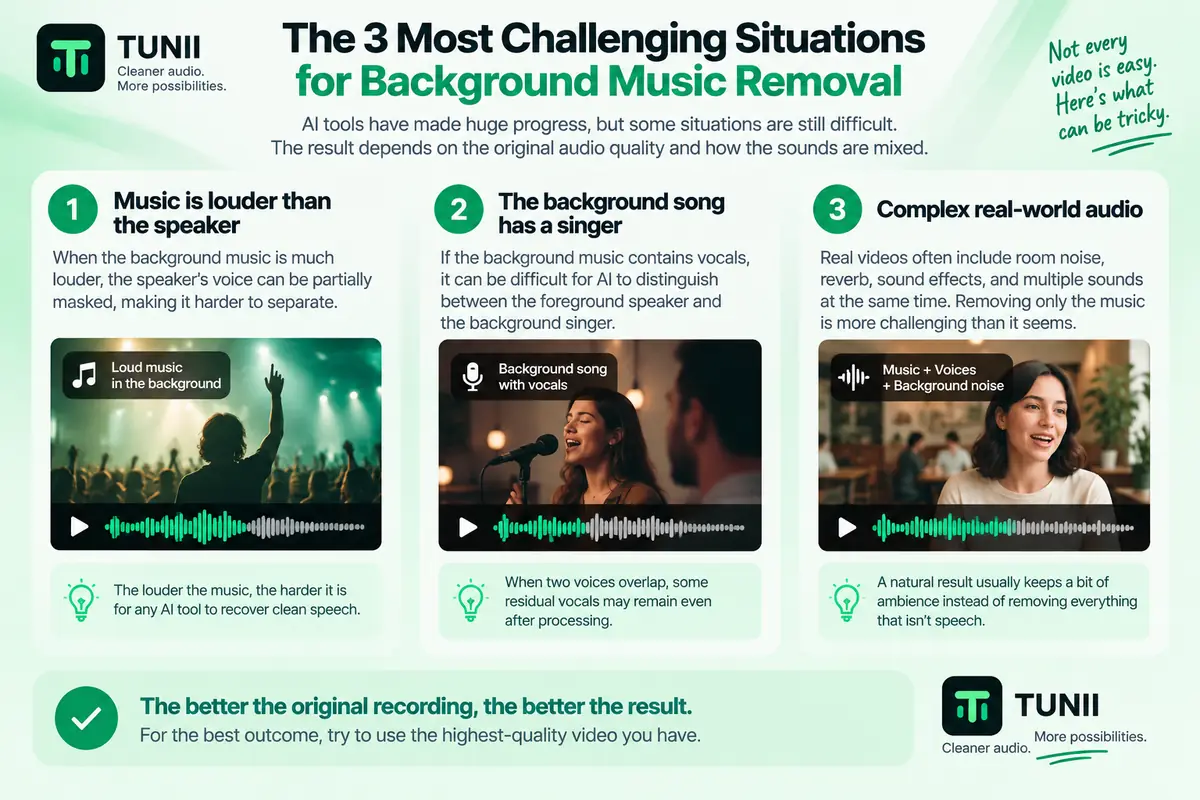
The Three Situations That Cause the Most Problems
1. The music is louder than the speaker
If speech is already buried underneath the music, removing the music does not magically recreate speech information that was never captured clearly.
The result may contain thin consonants, metallic edges, pumping, or missing syllables.
Sometimes reducing the music rather than eliminating it completely produces a more natural result.
2. The background song has a singer
This is probably the most useful stress test of any background music remover.
The system has to understand that one human voice belongs to the foreground dialogue while another human voice belongs to the background soundtrack.
A normal vocal separator may not make that distinction.
3. The video contains useful ambience
Removing every non-speech sound can create an unnaturally dry result.
Imagine a street interview where you can see cars, people, and movement, but after processing you hear nothing except one isolated voice.
Technically clean does not always mean believable.
This is why speech/music/ambience or dialogue/soundtrack/effects separation can be more useful than a simple voice/instrumental split.
Background Music Remover vs. Vocal Isolator
These tools sound similar, but they are meant for slightly different jobs.
A background music remover is designed around a finished video: keep the video and dialogue, remove the unwanted music.
A vocal isolator is more useful when the audio itself is what you care about.
If you specifically want to isolate the voice track rather than generate a cleaned video, use Tunii's AI Vocal Isolator.
What If You Need More Than Voice and Music?
Sometimes background music removal is only the first step.
If you are working with a song or complex production and want separate vocals, drums, bass, and instruments, then a background music remover is the wrong tool.
Use Tunii's AI Stem Splitter instead.
That is a stem-production task, not a video-cleanup task.
What If You Only Want the Audio From the Video?
Then you do not need AI separation at all.
If your only goal is:
video.mp4 → audio.mp3
That is faster and conceptually much simpler than separating voice and music.
Background Music Remover vs. Vocal Remover
They solve almost opposite problems.
A background music remover usually tries to keep speech and remove the music.
A vocal remover usually tries to remove the singer and keep the instrumental.
If you are working with a song rather than spoken video, Tunii's AI Vocal Remover is the better fit.
FAQ
What is the best background music remover for video?
For creators who already have a finished video and want a direct video-to-clean-video workflow, Tunii's Background Music Remover is our first choice.
The main reason is simple: the workflow ends with a cleaned video rather than only a separated audio stem.
Can I remove music from a video but keep the voice?
Yes. AI source separation can separate foreground speech from background music in many videos.
The quality depends on the original mix. Very loud music, reverb, heavy compression, and songs with a singer behind the speaker are harder than quiet instrumental background music.
What is the best free background music remover?
Free plans change frequently.
A free tier may mean limited processing minutes, smaller files, preview-only results, daily credits, or account requirements.
Check the current download and duration limits before choosing a tool based only on the word “free.”
Can AI remove a background song that contains vocals?
Sometimes, but this is one of the hardest cases.
The system has to distinguish the person speaking in the foreground from the singer inside the background song.
General vocal separators may preserve both voices, so results vary more than they do with instrumental music.
What if I only want to extract the audio from my video?
If you do not need to separate music from speech and simply want the video's audio as a separate file, use Extract Sound from Video.
What is the difference between a background music remover and a vocal remover?
A background music remover usually keeps speech and removes the music underneath it.
A vocal remover normally does the opposite for songs: it removes the singer while keeping the instrumental.
If that is your goal, use Tunii's AI Vocal Remover.
Final Verdict
The best tool depends on what you want after the separation.
If you need stems for detailed editing, several tools in this list give you more granular control. If you are repairing professional material, a suite such as iZotope RX makes more sense.
But most people searching for a background music remover are starting with something much simpler: a finished video they want to keep using.
If that is your situation, Tunii's Background Music Remover is our first choice because the workflow ends where you actually need it to end — with a cleaned video, not just another audio file.
Upload the video, keep the dialogue, remove the unwanted music, and move on with the edit.
Frequently Asked Questions
What is the best background music remover for video?
For creators who already have a finished video and want a direct video-to-clean-video workflow, Tunii is our first choice. It is designed around keeping the foreground dialogue while removing or reducing background music, then returning a cleaned video rather than only an audio stem.
Can I remove music from a video but keep the voice?
Yes. AI source separation can separate foreground speech from background music in many videos. Results depend on the original mix, and difficult cases include very loud music, strong reverb, heavy compression, and songs with a singer playing behind the speaker.
What is the best free background music remover?
Free plans change frequently and may limit processing minutes, file size, downloads, or require an account. Check the current limits before choosing a tool based only on the word free.
Can AI remove a background song that contains vocals?
Sometimes, but this is one of the hardest cases. A system has to distinguish the foreground speaker from the singer inside the background song. General vocal separators may preserve both voices, so results vary more than with instrumental background music.
What if I only want to extract the audio from my video?
If you do not need to separate the voice from the music and only want the video's audio as a separate file, use Tunii's Extract Sound from Video tool instead.
What is the difference between a background music remover and a vocal remover?
A background music remover usually keeps speech and removes the music underneath it. A vocal remover is normally used on songs to remove the singer while keeping the instrumental.
 Tunii
Tunii